 Easily Create Database-Driven, SCORM-Compliant Exams
Exam Engine now is completely HTML and JavaScript!
Exam Engine was selected for an Award of Excellence in the 9th Annual Best of Elearning! Awards in the "Assessment" Category.
New in Version 4.5
- All templates use Responsive Web Design to adapt to different screen sizes from mobile devices to desktops
- Deploys via HTML and JavaScript with NO plugins
- Supports Internet Explorer 7 and later, Firefox, Chrome, Safari, and other browsers
- All templates completely HTML and CSS
- Validates login and password against included web service
- Validates login and exam so that unauthorized users are excluded from an exam
- Allows users to review questions at the end of the exam if desired. Questions
are locked but show how the student answered. Any media associated with the
question will play.
- Displays score by objective as well as overall score
- Detects HTML 5 media capabilities and uses it to play media if available
- Reverts to Flash, Windows Media Player, or QuickTime as appropriate if HTML
media playback is not supported
- Optionally includes ALL audio (mp3, oga, wav) and video (mp4, webm, ogv, wmv)
formats to support media on all major browsers
- Optionally shows HTML 5 audio controls when playing audio
- Plays Adobe Edge or other HTML media
- Lets you choose between graphical buttons and jQuery UI
buttons
- Has an enhanced Reporter
application with new and redesigned reports that show data by exam, user, and
question
- Includes new reports for the Question Editor
- Seamlessly updates version 2 and version 3 exams
- Includes source [HTML and JavaScript] to allow advanced users to extend product
- Much more!
Other Great Features
- Support for AICC as well as SCORM™ 1.2 and 2004
- Numerous sophisticated question types including Hot Objects, Hot Spot,
Matching, Matching (Lines), Numeric, Sequencing, and Sequencing (Images)
- Up to four graphics and four media for each question
- Correct, Incorrect, and "Partially Correct" media feedback
- Deploy without a virtual directory on any web server
- Optional web service for emailing results, saving question and exam results,
validating logins, and emailing technical support
- Package exam with question database or load questions at runtime from the web
service
-
Reporter
program for displaying reports for question analysis and on question and exam
results
- Easy-to-use Question Editor
with enhanced editing features and "phrases" available via a right-click menu
- Improved Configuration Editor
with rapid exam publishing
- Countdown timer that displays time remaining for question and turns red when
75% of the time has elapsed
- Easily support multiple languages
- Automatically email results in Microsoft®
Word, Microsoft Excel, HTML, and/or plain text formats (using optional web
service)
- Display an optional Login page for capturing user name when not run via a
Learning Management System
- Hide exam results if desired for high-stakes tests
- Redirect to a URL when SCORM is not detected
- Display an optional technical support email message, link, and input screen for
communicating with a help desk or administrator
Pull Random Questions from a Pool By Objective
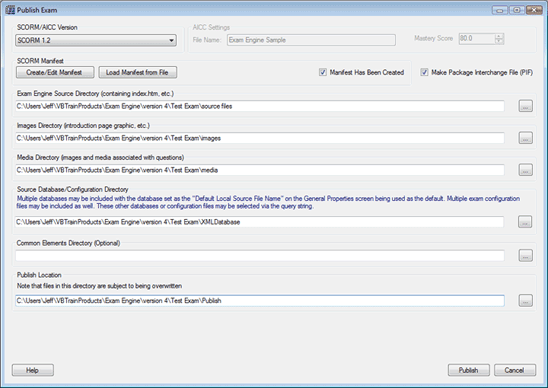
Associate questions with one or more objectives. Then grab a designated number of questions from each objective, giving each student a different exam. The questions and objectives are stored in SQL Server, Access, or XML -- your choice.
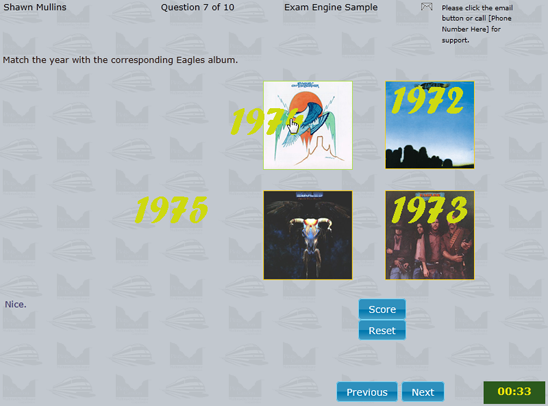
Matching Question in Desktop Browser
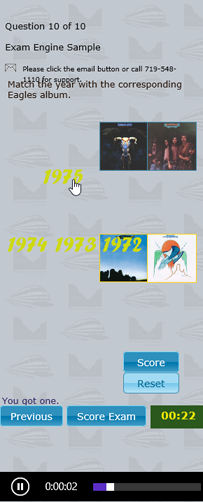
Matching Question at 500 and 300 pixels showing Responsive Web Design
Communicate with a SCORM Learning Management System
Simply check a box in the configuration editor or change your URL query string and your exam will send all interaction information to your SCORM 1.2 or 1.3 (2004) LMS. The exam can be packaged as a complete SCO (including manifest). Exam Engine reads the mastery score, maximum time allowed, and more from the LMS.
Store or Email Individual or Composite Results
In addition to (or instead of) sending results to your LMS, you can have composite results (including question responses and time per question) stored on the web site in Access, SQL Server, or XML. Individual results can be emailed in Word, Excel, HTML, or plain text formats to one or more addresses either automatically or via student interaction. Composite results can be emailed if stored in Access or XML. Use the optional Reporter program to view question analysis and other reports from anywhere in the world.
Highly Customizable Yet Easy to Use
Questions can be multiple choice (with more than one correct answer if desired), true or false, fill-in-the-blank, hot objects (images), hot spot (images), matching (drag & drop images), matching (lines), numeric, sequencing (text), and sequencing (images). They can have up to eight answers and four levels of feedback. The questions can have up to four associated graphic or media files. You can also have correct, incorrect, or "partially correct" media display upon scoring the question. The developer can completely customize the colors and graphics associated with each question state (initial, selected, correct, and incorrect). You can even have a “Show Answers” button display after a defined number of wrong answers. Tweak question templates and/or button graphics if desired or just use the defaults and be up and running in five minutes. Either way, there is absolutely no programming!
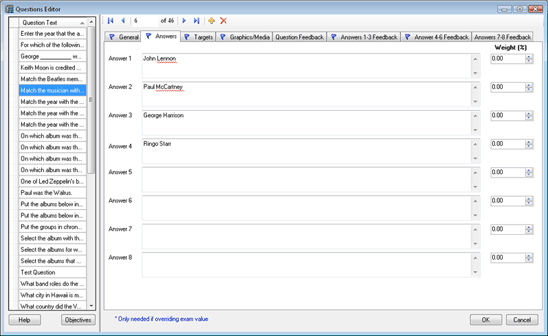
Allow Your Subject Matter Experts to Write Questions Rather Than Try to Learn
an Authoring Tool
Exam Engine has a special “Question Editor” (with built-in spell checker and reporting) that your Subject Matter Experts can use to add, edit, or delete questions and objectives. They spend their valuable time writing dynamite questions and associating them with objectives rather than trying to learn an authoring tool. They can even create reports of questions by objectives, media required, objectives associated with each question, and much more!
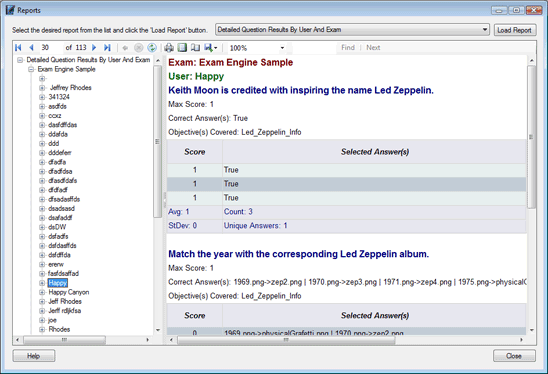
View Question Analysis and Student Data Reports
Exam Engine has an optional "Reporter" application that allows you or your customers to connect directly to your Exam
Engine web service and view these reports: Answers per Question, Detailed Question Results by Exam, Exam Scores, Question Results by Exam, Scores by Exam, Scores by Exam and User, Scores by User, Scores by User and Exam. Limit reports to particular exams, users, and/or questions.
System Requirements:
Client Machines
-
Internet Explorer 7 or later, Firefox, Safari, or other browser
Database
-
Microsoft® SQL Server™ 2000 or later, Access 97 or later, or none at all (XML format)
Development Computer
-
Ability to load the .NET 4.0 Framework (Windows XP SP2 or later)
-
Microsoft® ReportViewer 2010 (installed as part of the Question
Editor and Reporter installations)
Price
Exam Engine
| Description |
Price
|
| Development License (includes all templates (and their HTML/JavaScript source), up to three licenses of the Exam Engine Question Editor, one license of the Exam Engine Configuration Editor, and the Exam Engine Web Service) |
$1,995 |
| Development License upgrade from version 3 |
$895 |
| Development License upgrade from version 2 or older |
$1,395 |
| Additional Licenses of Question Editor (for use by subject matter experts) |
$395 each |
| Additional Licenses of Question Editor upgrade from version 3 |
$175 each |
| Additional Licenses of Question Editor upgrade from version 2 or older |
$275 each |
| Exam Engine Reporter (requires that exams store their results with the Exam Engine Web Service) |
$495 each |
| Exam Engine Reporter upgrade from version 3 |
$195 each |
Technical Support
| Description |
Price
|
| One year email technical support |
$445 |
Try It Out
Exam Engine sample
Run Exam Engine as a SCORM lesson in Tracker.Net
Blog Post on the History and Advantages of Template-Based Authoring
Blog Post on Responsive Web Design
Please send any comments, questions, problems, or feature requests to: info@plattecanyon.com
Comments
-
We just purchased Exam Engine from Platte Canyon and I love it. You can add graphics and there are several question types. It allows questions to have one or more topics associated with them and you can build the test by choosing 4 questions from on topic and 2 questions from another. It will then randomize the questions and answers if you choose. And...if you have any trouble, Jeff Rhodes is awesome for technical help.
-
Damn, very impressed!
-
I thought Exam Engine was a perfect solution when I found it and was not disappointed. Also, we definitely appreciate the custom tweaks you created for us (e.g. hiding the detailed results and creating the redirect when SCORM connection not established). `
-
We exclusively use Exam Engine for all assessments developed.
-
Exam Engine's ability to quickly and easily create SCORM-compliant online exams that read from a database have allowed me to better support customers like FirstEnergy. -- Robert Culver, 4D Solutions, Inc.
-
BTW, you guys did a REALLY nice job with the VBTrain controls and Exam Engine!